































Most laser TV projector shopping starts with a spec sheet and ends with a tape measure. Before anyone compares 5,700 lumens against 4,100, they want to know if a 100-inch or 120-inch picture fits the wall they already own, and how it holds up on a Sunday afternoon with the blinds open.
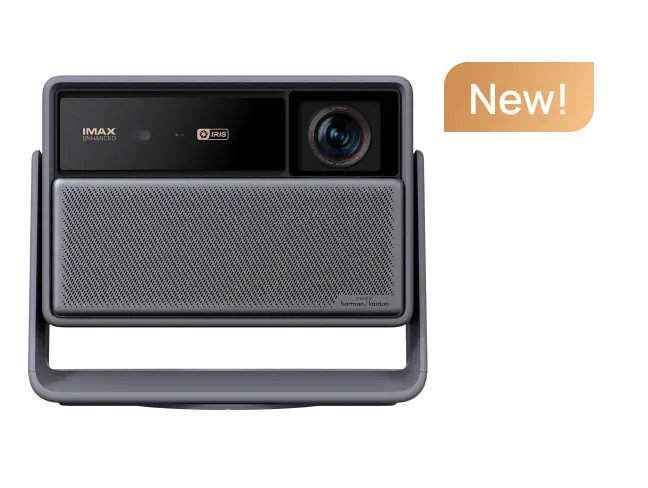
Ultra short throw buying usually goes wrong at exactly that point. The XGIMI AURA 3 Series works as an example, since both models are ultra short throw laser TV projectors that share one platform and differ mainly in brightness and contrast, which is where room conditions start to count.
Throw Ratio Decides Almost Everything
A laser TV projector is not simply a scaled-up long-throw projector. Designed to sit close to the wall, often on a low media console, it projects upward at a steep angle to create a large image in a compact space. Its throw ratio, calculated by dividing the lens-to-screen distance by the image width, determines how close it can sit to the screen.
Common Projector Throw Ratio Categories
|
Projector Type |
Typical Throw Ratio |
Typical Placement |
|
Standard / Long-Throw Projector |
Typically 1.0:1 or higher |
Positioned farther from the screen |
|
Short-Throw Projector |
Approximately 0.4:1 to 1.0:1 |
Positioned closer to the screen than standard-throw models |
|
Ultra-Short-Throw (UST) Projector |
Typically below 0.4:1 |
Positioned very close to the wall or screen, often on a low media console |
- Note: These ranges are general industry guidelines, not universally standardized classifications. Actual specifications may vary by manufacturer and model.
Ultra-short-throw (UST) models vary in their throw ratios and placement requirements. The AURA 3 Max can project a 120-inch image with its body positioned just 8 inches from the wall, thanks to its ultra-short 0.163:1 throw ratio.

That has two practical effects. The console has to be stable, deep enough for the projector body, and level enough to keep the image square, because sliding the chassis an inch or two changes the picture size by several inches. The light path matters too. A soundbar or a raised console edge in front of the lens will clip the bottom of the picture, and no amount of keystone correction brings that detail back.
How Big a Picture will Actually Fit
Ultra short throw projectors typically cover about 80 inches to 150 inches diagonally, and the wall usually sets the real ceiling rather than the projector. A 16:9 image at 100 inches diagonally is about 87 inches wide and 49 inches tall. At 120 inches it becomes roughly 105 inches wide and 59 inches tall, and a 150-inch picture needs around 131 inches of clear wall. Add margins, then check for furniture, a fireplace or a doorway that would break the surface.
|
Diagonal |
Image width |
Image height |
Comfortable viewing distance |
|
100 inches |
about 87 inches |
about 49 inches |
6 to 8 feet |
|
120 inches |
about 105 inches |
about 59 inches |
7.5 to 10 feet |
|
150 inches |
about 131 inches |
about 74 inches |
9 to 12 feet |
Seating distance follows the same logic. For 4K content, sitting between 1.5 and 2 times the image height is a sensible starting point, and most living rooms fall inside that range without moving the sofa.
Daylight, Wall Color, and the Screen Question
Ambient light is the biggest single difference between an image that reads like a television and one that looks washed out. On a plain white wall, a laser TV projector works in a darkened room and struggles in a bright one, because the wall reflects light from the room as well as the image. An ambient light rejecting (ALR) screen changes that. Screens built for ultra short throw geometry push away light arriving from above while holding onto the angled projection light, at the cost of a narrower viewing cone.
Brightness sets the headroom. AURA 3 Max is rated at 5,700 ISO lumens and AURA 3 Pro at 4,100 ISO lumens. A room with large windows and no shades, or a household that watches sports during the day, leans toward the brighter model. A room used mainly after dark, or one with blinds that close, is well served by the Pro. Cheap fixes help either way: keep direct sun off the screen, keep lamps from landing on the picture, and consider a beige or gray wall instead of white.

Where the Image Quality Comes From
Contrast separates a flat projection image from a convincing one, and it is why the two AURA 3 models are priced differently. Native contrast is rated up to 8,000:1 on the Max and up to 7,000:1 on the Pro, and both use a dual dynamic iris with DBLE light control to deepen blacks and hold shadow detail in dark scenes.
The light engine matters as well. Both models use an RGB triple laser source, which avoids the color wheel behind the rainbow effect on some single-chip DLP projectors.
XGIMI tackles the remaining artifacts with dedicated anti-RBE processing, and an X-VISION AI image processor handles scene-by-scene adjustment. The series also supports IMAX Enhanced and Dolby Vision, so a Dolby Vision stream is not flattened into a generic HDR curve.
The Refresh Rate is the Part You Feel
Refresh rate rarely appears in a spec comparison until someone watches a game on a big screen. At 120Hz, fast panning across a football field or a race track holds a cleaner edge than the same footage at 60Hz, and the effect is easier to see on a 120-inch image than on a 55-inch television, because the movement covers more of the field of view.
XGIMI describes the AURA 3 Series as the first ultra short throw line with 4K 120Hz playback, which puts it in a different category from most laser TV projectors. One detail sits outside the spec sheet: the rest of the chain has to keep up. A 4K 120Hz signal needs an Ultra High Speed HDMI cable rather than an older High Speed cable from a drawer, and the source has to output 4K at 120Hz in the first place.
Buying XGIMI AURA 3 Series in the United States
The AURA 3 Series opens through a $50 fully refundable deposit on xgimi.com, which adds $200 in cashback on top of the Super Early Bird price:
- $2,199 for AURA 3 Max against an MSRP of $4,999,
- and $1,999 for AURA 3 Pro against an MSRP of $3,999.
article_product1
The deposit window runs from 1 September to 20 October 2026, when the Kickstarter campaign opens. US backers pay the $50 deposit today on xgimi.com, and Kickstarter charges the pledge itself in US dollars once the campaign ends.
Shipping is expected to begin in December 2026, in pledge order, with final regions and timelines confirmed on the Kickstarter page.
- Note: For accurate and up-to-date product details and terms, please refer to the product page.
FAQ
1. How large a screen can a laser TV projector fill?
Most ultra short throw models cover about 80 to 150 inches diagonally. A 150-inch 16:9 image needs roughly 131 inches of clear wall width before you add margins.
2. How far from the wall does a laser TV projector sit?
Ultra-short-throw (UST) projectors typically have a throw ratio below 0.4:1, allowing them to produce large images from just inches away from the screen.
The XGIMI AURA 3 Series takes this further: the AURA 3 Max can project a 120-inch image with its body positioned just 8 inches from the wall, thanks to its ultra-short 0.163:1 throw ratio.
3. Do I need an ALR screen in a bright room?
Not mandatory, but it is the most effective upgrade in a room with daytime light, because it rejects light from above and protects contrast.
4. XGIMI AURA 3 Max or Pro for a bright living room?
AURA 3 Max brings 5,700 ISO lumens and suits rooms where sunlight reaches the screen. AURA 3 Pro at 4,100 ISO lumens fits controlled light.
5. Can I project onto a normal white wall?
You can in a darkened room. In daylight, or on a tinted wall, colors and contrast shift, and a screen earns its cost.
Before You Commit, Check These Five Things
- Clear wall width, including a margin either side of the intended image
- A stable, deep media console, with nothing in front of the lens
- Where daylight lands during the hours you actually watch
- Seating distance, ideally between 1.5 and 2 times the image height
- A decision on an ambient light rejecting screen versus the painted wall
Settle those and the specification conversation gets much shorter. AURA 3 Max is the brighter, higher-contrast option for a room with real ambient light, while AURA 3 Pro covers a controlled space for less. Both bring the same 4K 120Hz playback, RGB triple laser engine, and IMAX Enhanced and Dolby Vision support, so the room decides more than the badge.


