































XGIMI Ceiling Mount (2026) | Tailored for XGIMI HORIZON 20/30 Series
- Tailored for XGIMI HORIZON 20/30 Series: Specifically designed for XGIMI HORIZON 20/30 Series projectors under 22 lb (10 kg), ensuring seamless compatibility.
-
Easy Installation: User-friendly setup process enables hassle-free ceiling mounting.
- Concealed Storage Solution: Unique hidden storage design keeps power adapter and cables neatly tucked away for a clean appearance.
-
Durable Build: Aerospace-grade aluminum construction ensures long-term stability.
(*We recommend installing the ceiling mount directly facing the projection wall. Sideways installation is not recommended.)" -
Sleek & Elegant Design: Seamlessly blends into home living spaces with a design that mirrors the XGIMI HORIZON 20 Series, adding sophistication to any room.
(*The adapter shown is for illustration only. Actual color and design may vary by projector model. Please refer to the adapter included for the specific projector.)"
XGIMI Ceiling Mount (2026)
Designed for the XGIMI HORIZON 20 Series
*The box only contains a ceiling mount. Projector not included.

22 lb (10 kg) Max Load

Easy to Mount

Quality Assurance
Excellent Companion for XGIMI HORIZON 20 Series
Customized accessory for XGIMI HORIZON 20 Series projectors under 22 lbs (10 kg); easily project high-quality images from the ceiling.
Compatibility:

HORIZON 20 Max 5.4 kg (11.9 lb)
HORIZON 20 Pro 4.9 kg (10.8 lb)

HORIZON 20 4.8 kg (10.58 lb)
Hidden Storage for a Clean Appearance
Unique concealed storage solution for the power adapter and cables, ensuring a tidy overall look.
Sturdy and Durable


Effortless Precision Alignment
With the projector’s built-in stand, the ceiling mount ensures effortless, precise, and flexible alignment for your ideal viewing experience.

Built to Last
The aerospace-grade aluminum construction delivers outstanding strength and durability, while a soft silicone pad cushions vibrations for a stable, clear image every time you turn on the projector.

Built to Last
The aerospace-grade aluminum construction delivers outstanding strength and durability, while a soft silicone pad cushions vibrations for a stable, clear image every time you turn on the projector.
Quick Start Guide


Precautions
To ensure a better user experience, please read the following notes carefully:
1. Follow the 'User Manual' and 'Precautions' during installation and use. If the instructions are not followed, the mount or the projector could fall or topple over, causing injury or accident to occur.
2. Check that the installation location's structure is concrete and strong enough before installing, and use the optimum installation method by following the 'User Manual'.
3. Do not perform the installation on any unstable or inclined surface.
4. Do not attach anything to this mount except for compatible XGIMI projectors.
5. Never loosen the screws or bolts after installation. Ensure that you check for any loose screws or bolts regularly, and if any are loose, tighten them completely.
6. Before turning on the projector, make sure the mount is firmly secured.
7. Do not cover or block the vent holes alongside the Magnetic decorative box of the mount.
8. Please read and follow the instructions carefully to use the installation mounts and the projector safely. Incorrect handling that ignores instructions in this guide could damage this product or result in personal injury or property damage.
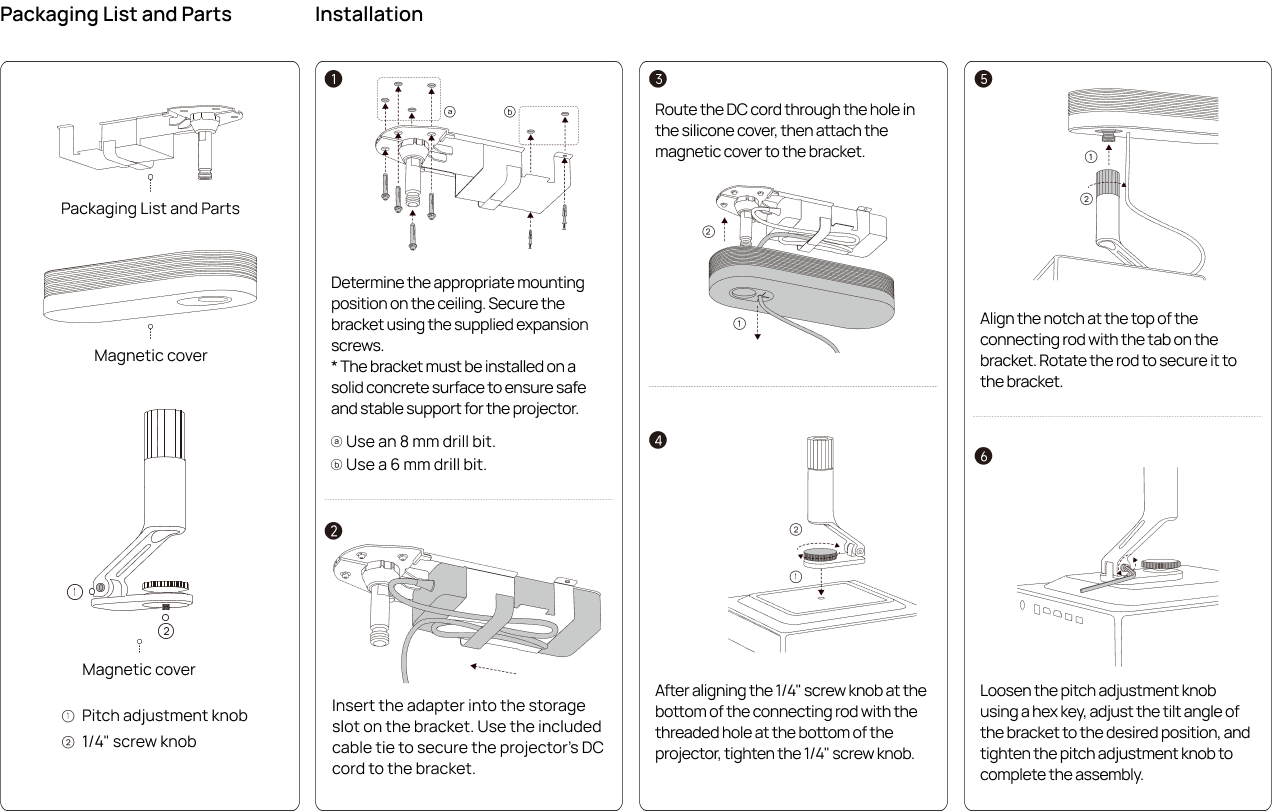
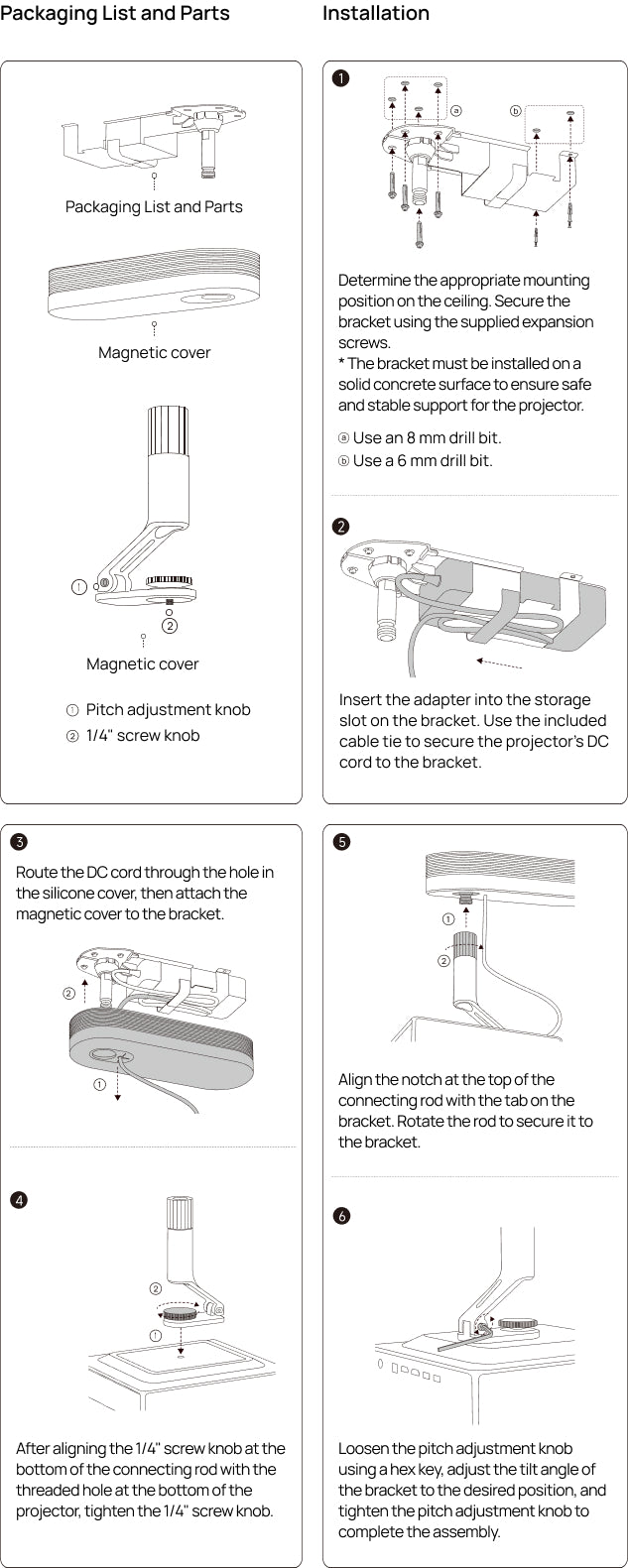

Mounting Hardware Kit × 1
(Expansion pipe × 2, Self-tapping screws × 2, Metal expansion screw assembly × 4)
User Manual × 1
FAQ
Q1. Which devices can be mounted to the XGIMI Ceiling Mount?
The XGIMI Ceiling Mount is compatible with the HORIZON Series, Elfin Series, Halo Series and MoGo Series.
* The adapter of Elfin, Halo and MoGo Series cannot be concealed within the storage slots.
* XGIMI Ceiling Mount is not compatible with other models. Please follow the compatible devices shown in the specs sheet.
Q2. Can the XGIMI Ceiling Mount be installed on the wall or floor?
The product is designed for ceiling-mounted projectors and unsuitable for other non-ceiling-mounted scenarios, please read the 'Installation Guide' carefully before use.
Q3. Can the projector's angle be adjusted after installation? How do I adjust it?
Yes, you can adjust the projector’s angle after installation. Our ceiling mount supports 12° of both pitch and elevation adjustment.
Q4. Does installation require drilling holes? Is it necessary to reserve sockets/interfaces?
For installation, use an electric drill to drill holes and reserve a power outlet. If you need to connect to the network or other devices, you should reserve relevant interfaces in advance.
Q5. Do I need to prepare the mounting hardware for installation?
The product package comes with the mounting hardware, no additional preparation is needed. Please see the details shown in the specs sheet.

$20
OFF
$15
OFF