








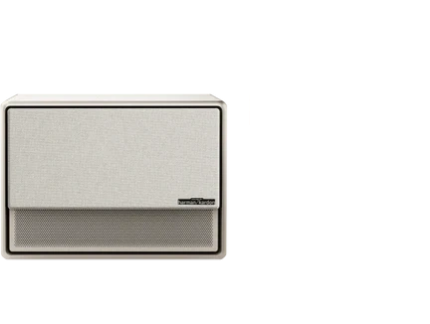
























Integrating an ultra-short-throw (UST) projector into a living room can deliver a large, immersive screen without the visual bulk of a wall-mounted TV, but only when the furniture, screen, and seating are planned together from the start. The key is committing to a fixed, low, centered layout that respects the projector's precise placement needs. When the cabinet height, projector-to-screen gap, and viewing distance fall into practical ranges, the setup stays clean, comfortable, and clutter-free; otherwise, alignment issues, reflections, or daily adjustments quickly make the room feel messy. For more on this topic, see The Case for Laser TVs: Why Ultra-Short Throw is Beating 98-Inch Pa.... For more on this topic, see How Intelligent Screen Adaption (ISA) is Eliminating Projector Setu....

For most living rooms targeting a 100-inch image, this means selecting low-profile furniture that supports stable placement, planning cable routes in advance, and choosing a screen position that works with your room's traffic flow. The following guide walks through the decisions that matter most so you can create a minimalist entertainment center that performs well and looks intentional.
Why UST Projectors Require Different Planning Than Traditional TVs
Unlike a TV that can sit on almost any stand, a UST projector must live on a low surface directly in front of the screen. The lens sits mere inches from the projection surface, so the furniture becomes part of the optical system rather than just a storage piece. Treating it like a simple TV swap often leads to tilted images, hot spots, or constant repositioning. For more on this topic, see The Benefits of Using a Dedicated Projector Floor Stand Over a Coff....
The biggest information-gain filter is whether your living room can support a permanent, centered relationship between the cabinet and screen. If the furniture moves frequently or the front wall cannot stay dedicated, alignment and cable clutter tend to become daily frustrations. This constraint-first approach helps many buyers decide early whether a UST setup is the right path or if another display type would integrate more cleanly.
Choosing the Right Furniture for Your UST Projector
Furniture selection is the foundation of a successful UST installation. The console or cabinet must be low enough to keep the projector lens at the correct height for your desired screen size while leaving room for ventilation and cable management.
A common practical target for cabinet or console height is roughly 18 to 24 inches. This range keeps the projected image properly framed for a 100-inch screen without forcing excessive keystone correction or an awkwardly tall unit. Choose pieces with an open rear or side design that allows airflow around the projector—enclosed cabinets can trap heat and reduce performance or lifespan.
Look for media consoles or low credenzas with sufficient depth to accommodate the projector's footprint plus a small positioning gap. Many successful setups use furniture that blends with existing decor rather than dedicated AV racks, helping the room retain its living-room feel. Avoid glossy or highly reflective surfaces near the projection area, as these can create visible glare or light bounce that degrades image quality. For more on this topic, see Overcoming Glare: Setting Up a UST Projector in a Room with Floor-t....
For renters or those in smaller apartments, freestanding consoles that require no wall modifications offer flexibility, while homeowners often benefit from built-in or semi-permanent cabinetry that conceals cables completely.
Here is a helpful heuristic visualization of how different factors influence suitability for a typical 100-inch UST living room setup:
Heuristic Suitability for a 100-inch UST Projector Setup
Illustrative ranges only; cabinet height and viewing distance are shown as heuristic fit bands, not measured requirements.
View chart data
| Category | Heuristic fit score |
|---|---|
| Cabinet height | 4.0 |
| Viewing distance | 4.0 |
| Small room | 2.0 |
| Medium room | 4.0 |
| Large room | 3.0 |
| Homeowner | 4.0 |
| Renter | 2.0 |
Based on viewpoint-insighter notes: fixed centered placement is critical; cabinet height heuristic range is 18-24 in, screen-to-seat viewing range is 8-12 ft, and gap clearance is 6-18 in. Small rooms are penalized by tighter placement tolerance; homeowner setups are more stable than renter freestanding setups. Scores are illustrative and bounded, not empirical.
This chart compresses the practical ranges into relative scores to highlight where setups tend to work more smoothly versus where they may require compromises.

Screen Placement and Projector Positioning
Precise alignment between the projector and screen is essential for a sharp, rectangular image. For a 100-inch setup, the UST projector typically sits very close to the screen—often with only a 6 to 18 inch gap depending on the exact model and lens design. This proximity means the cabinet must be positioned exactly where the screen will be mounted or placed.
Many users pair UST projectors with ambient-light-rejecting (ALR) screens designed specifically for ultra-short-throw use. These screens improve contrast and brightness in living rooms without requiring a completely dark environment. Mount the screen centered on the wall at the correct height so the bottom edge clears the top of your chosen console.
Test the layout with painter's tape on the floor and wall before making permanent decisions. Small errors in centering or distance can cause the image to miss the screen edges or require digital correction that reduces resolution.
For more on optimizing image quality in various lighting conditions, see our guide to daytime projector setup.
Determining Comfortable Seating and Viewing Distance
Viewing distance should prioritize comfort over strict formulas. For a 100-inch screen, many people find 8 to 12 feet provides an immersive yet relaxed experience in a living room. Closer distances can feel cinematic but may make screen texture more noticeable, while farther seating can reduce the sense of scale.
Arrange seating so the primary viewing positions stay relatively centered with the screen. Off-axis seating is less forgiving with large projected images than with TVs, potentially causing brightness falloff or distortion at the edges.
In open-plan homes, consider how the layout affects traffic flow. Avoid placing the main sofa where people constantly walk between the projector and screen, as this creates shadows and interrupts viewing.
Cable Management and Power Planning for a Minimalist Look
Visible cables are one of the fastest ways to make even an expensive setup look cluttered. Plan power outlets and signal sources before choosing furniture. Many modern consoles include built-in channels or rear compartments for hiding HDMI cables, power cords, and streaming device connections.
If your room lacks convenient outlets near the front wall, consider professional installation of recessed power solutions or wireless HDMI options where available. Keep media players, soundbars, and other components either inside the console or on a nearby low shelf to maintain clean sight lines.
Common Mistakes to Avoid in UST Living Room Setups
Several pitfalls frequently disappoint first-time UST buyers:
- Placing the projector on an uneven or wobbly surface that shifts over time
- Choosing furniture that is too high or too shallow for proper lens height and footprint
- Ignoring reflections from glossy coffee tables, nearby windows, or light-colored walls
- Assuming the setup can be moved frequently without realignment
- Skipping a dedicated ALR screen in moderately lit rooms
A useful self-check before purchase: Can the cabinet stay permanently centered under the screen? Can cables be fully hidden? Does the room allow seating in the comfortable distance range without blocking walkways? If the answer to any of these is no, the setup may require more compromises than expected.
Do not proceed with a UST furniture plan if your living room layout forces frequent furniture movement, off-center projector placement, or unavoidable cable visibility. In those cases, the daily friction often outweighs the benefits of a large screen.
Room Layouts That Work Best for Different Homes
The ideal configuration depends on your space and lifestyle. Homeowners with stable rooms often choose a dedicated low cabinet built into or against the media wall, allowing perfect centering and concealed wiring. Renters or apartment dwellers usually prefer versatile freestanding consoles that can be adjusted slightly and require no permanent changes.
Smaller rooms (under 12 feet deep) face tighter tolerances for both projector placement and seating, making them more challenging but still workable with careful measurement. Medium-sized living rooms tend to offer the best balance of screen impact and comfort. Larger open spaces may need strategic placement of the screen wall to avoid excessive distance or competing light sources.
Design-focused buyers should prioritize furniture that matches their existing decor style while meeting the technical requirements. Many successful installations use the projector and screen as the focal point of an otherwise minimalist entertainment area.
For additional ideas on creating effective home projector environments, review our comprehensive article on home projector setup.
Quick Room-Readiness Checklist
Before buying furniture or committing to a 100-inch UST layout, run through these practical checkpoints:
- Measure your intended cabinet height—does it fall in the 18–24 inch practical range?
- Confirm you can position the projector centered and at the correct distance from the screen location.
- Check that primary seating can be placed approximately 8–12 feet from the screen without blocking pathways.
- Verify power and cable routing options exist without creating visible clutter.
- Ensure the front wall area can remain relatively free of reflective surfaces and competing light.
- Test whether the furniture can stay fixed once installed.
Passing most of these checks significantly increases the chance of a clean, enjoyable setup.
Bringing It All Together
A well-planned UST projector installation transforms a living room into a versatile home theater while preserving its everyday usability. Success comes from treating the projector, furniture, screen, and seating as an integrated system rather than separate purchases. For more on this topic, see The Invisible Home Theater: Integrating Projectors into Minimalist ....
By selecting appropriate low furniture, maintaining precise alignment, managing cables thoughtfully, and positioning seating for comfort, you can achieve a minimalist entertainment center that looks intentional and delivers impressive performance. The effort invested in measuring and planning upfront prevents most of the common regrets that arise when UST systems are treated like conventional TVs.
This guide provides the framework; your specific room dimensions and lifestyle will determine the final details. Take accurate measurements, test the layout with temporary markers, and choose pieces that support both the technical requirements and your design vision. When these elements align, the result is a clean, clutter-free big-screen experience that enhances rather than overwhelms your living space.
Important Note on Comfort and Setup: This article discusses practical furniture selection, room layout, and viewing geometry for improved comfort in typical living room conditions. It is not medical advice and does not address eye conditions or health diagnoses. Projection setups involve individual preferences and room variables. If you experience persistent eye strain, headaches, or discomfort during use, consult a qualified eye care professional. Results depend heavily on specific device models, room lighting, and personal sensitivity.
For XGIMI UST models and compatible accessories, explore our AURA series projectors or the dedicated XGIMI 100" UST ALR Screen. Additional helpful resources include our collections of home projectors and stands and accessories.


