































A portable projector for home use lets you move movie night from the bedroom to the living room without installing a permanent screen. But the best portable projector isn't necessarily the smallest one. Your lighting, available space, streaming habits, and access to power all affect the experience. Whether you're considering a portable mini projector for a small apartment or a flexible home entertainment setup, here's what matters before you buy.
Who Should Choose a Portable Projector?
A portable projector suits renters, apartment dwellers, and anyone who likes watching movies in different rooms. Unlike a fixed setup, a compact projector can sit on a nightstand or table and be stored when you're done.
Compact size and weight matter, but so does everyday convenience. A built-in handle or carrying handle can make a device easier to move, while an adjustable stand reduces the need for extra equipment. Neither feature guarantees battery-powered operation.
Most portable projectors still require careful placement, and some need an outlet. Smaller projectors aren't necessarily available at a lower price, either. If you watch television throughout the day in a bright living room, a TV or more powerful full-size projector may suit your routine better.
For occasional bedroom movies, however, a portable design can be practical. Even if you also need the device for business presentations or occasional outdoor use, prioritize the room where you'll watch most often.
Explore XGIMI portable projectors to see how size, power, and smart features vary across the range.
Choose Picture Quality for Your Lighting
Lighting conditions make a major difference in picture quality. In a dark room, even a modestly bright projector can produce an enjoyable image. With windows open or ceiling lights on, that same image may look washed out.
Good light control is usually the simplest improvement. Close curtains, dim nearby lamps, and avoid directing light onto the screen. A smaller image can also appear brighter because the available light is concentrated over less area.
Don't rely on descriptions such as "super bright" or assume that higher brightness guarantees better results. Check the published max brightness rating and its measurement standard. XGIMI lists ISO lumens for the recommended models below; ANSI and CVIA lumens use different standards and shouldn't be treated as interchangeable.
Consider resolution, contrast ratio, and color accuracy alongside brightness. Displayed resolution determines the image detail the projector can produce, while supported input resolution only tells you which signals it accepts. When comparing native resolution claims, remember that accepting 4K content doesn't automatically mean displaying 4K detail.
Light-source technology matters too. An LED light source and a triple laser light source can have different performance characteristics, but laser technology alone doesn't guarantee better contrast or natural-looking colors.
The right balance depends on your room. You may benefit more from improving light control than simply purchasing a projector with more brightness. See XGIMI's guide to projector brightness in bright rooms for additional setup advice.

Get Screen Size and Placement Right
Before choosing a projector, measure the usable wall width and the distance between your planned projector position and the screen.
Throw ratio describes lens-to-screen distance divided by image width. For example, at a 1.2:1 throw ratio, a 100-inch diagonal image with a 16:9 aspect ratio is approximately 87 inches wide. It needs about 8 feet 9 inches between the lens and screen.
A larger screen isn't automatically better. The farther light spreads, the harder it can be to maintain brightness and contrast. For smaller rooms, start with a screen size that fits comfortably rather than the manufacturer's maximum advertised image.
A smooth, light-colored wall can be adequate for casual viewing. A flat projection screen may provide more consistent results.
Automatic setup features can make moving between rooms easier. Auto focus helps sharpen the picture, while auto keystone correction adjusts its shape. Both are available on the XGIMI models discussed below, but digital keystone correction doesn't replace proper physical placement or fix an uneven wall.
For a more accurate setup, use the XGIMI projection calculator to estimate screen size and projection distance.

Plan Streaming, Audio, and Power
Convenient home viewing depends on more than the picture.
Streaming and connectivity
With Google TV built in, compatible smart projectors provide direct access to supported streaming services without requiring a separate streaming stick. The XGIMI MoGo 4 and MoGo 4 Laser support licensed Netflix, and the MoGo 4 Laser's US product page also lists Amazon Prime Video.
You still need an internet connection and the appropriate subscriptions to watch Netflix or other services. App availability and playback capabilities can vary by model and platform.
An HDMI input lets you connect compatible streaming devices, laptops, or other video sources. Wireless screen mirroring from mobile devices is another option, but it depends on the projector's supported casting method and the app's restrictions. Wi-Fi and Bluetooth alone don't guarantee video casting compatibility.
Check other features carefully. A USB-A port doesn't necessarily support every local video format, and USB-C isn't automatically a video input.
Sound and speaker setup
Built-in speakers are convenient for casual viewing in a quiet bedroom. For a larger living room, a separate sound system may help with dialogue clarity, bass, and overall audio quality.
Speaker wattage alone doesn't determine sound quality. Consider listening distance, room size, and whether you'll regularly watch with other people.
For external audio, the MoGo 4 series lists HDMI ARC support, while Elfin Flip 4K lists HDMI eARC and a wired audio output. Check compatibility before purchasing speakers or headphones; Bluetooth audio functions aren't identical across devices.

Battery life and external power
Battery life deserves attention if you frequently watch away from outlets. However, battery-powered convenience shouldn't automatically outweigh brightness, placement, or other features important to daily home use.
The MoGo 4 and MoGo 4 Laser include built-in batteries rated for up to 2.5 hours of video playback in Eco Mode. Runtime may decrease when using brighter settings.
Both models also support USB-C Power Delivery charging, but a compatible external power source must meet XGIMI's specified requirements. Not every USB-C phone charger or power bank will work.
If you normally watch near an outlet, consistent AC power may be the simpler option.
Three XGIMI Models for Different Rooms
The right projector depends on where you watch and how often you move it.
1. XGIMI MoGo 4 — for bedrooms and small apartments
The XGIMI MoGo 4 combines displayed 1080p resolution, an LED light source, 450 ISO lumens, and a built-in 360-degree adjustable stand.
Weighing approximately 2.9 pounds, it fits households that value simple room-to-room setup. Its built-in battery supports up to 2.5 hours of video playback in Eco Mode, and Google TV provides licensed Netflix access.
Its limitation is brightness. The MoGo 4 is better suited to darker rooms than spaces with significant ambient light.
article_product1
2. XGIMI MoGo 4 Laser — for portable laser entertainment
The MoGo 4 Laser offers displayed 1080p resolution, a triple laser light source, and 550 ISO lumens.
It weighs roughly 2.9 pounds and includes a 360-degree adjustable stand, Google TV, and a built-in battery rated for up to 2.5 hours of video playback in Eco Mode.
Its higher rated brightness gives it an advantage over MoGo 4 on that specification, but it still benefits from dim lighting. It's a practical choice for people who want portable laser technology without a fixed installation.
article_product2
3. XGIMI Elfin Flip 4K — for flexible living-room viewing
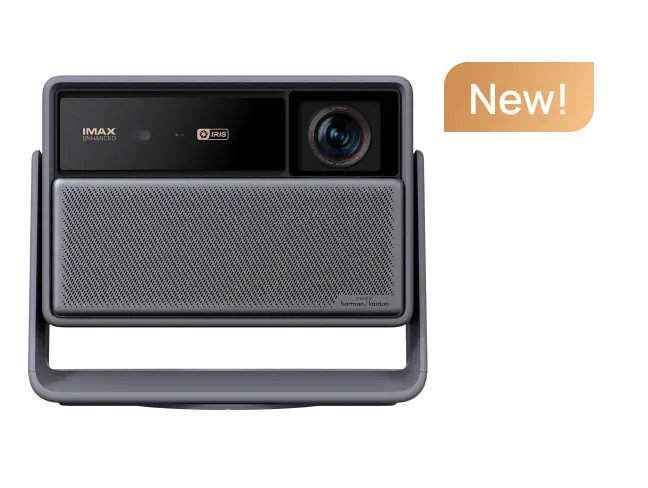
The Elfin Flip 4K displays 3840 × 2160 (4K), offers 1,600 ISO lumens, and weighs approximately 3.4 pounds.
Its 0.98–1.3:1 optical zoom provides additional placement flexibility. It also includes Google TV, autofocus, and auto keystone correction.
This model suits users who want higher-resolution home entertainment and more rated brightness than the two MoGo options. Its main limitation is power: it requires external AC power and does not include a built-in battery.
article_product3
Compare Carefully Before Buying
Searching for the best projectors or reading projector reviews can help you build a shortlist. But the best portable option for one home may be unsuitable for another.
If you're comparing the XGIMI MoGo series with an Anker Nebula Capsule, Nebula Mars 3, Epson EpiqVision projector, or an older XGIMI Halo, check the exact model version. The Nebula Mars family, for example, includes distinct products: Mars 3 and Mars 3 Air shouldn't be treated as interchangeable.
Compare verified brightness units, displayed resolution, battery requirements, streaming support, and placement flexibility rather than relying on rankings. A projector designed around outdoor mobility or business presentations may prioritize different features from one intended for evening movies at home.
For your own setup, start with three questions: Can you control the light? Can you place the projector at the required distance? And do you have the power and connections you need?
A portable projector for home viewing should fit those everyday conditions—not just look impressive on a specification sheet.


