
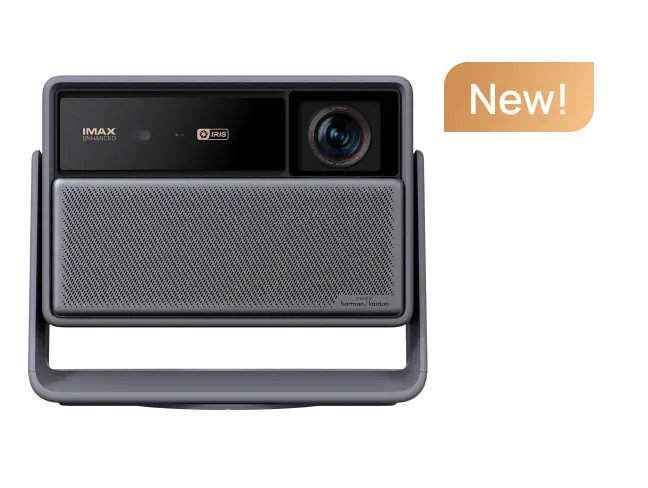































This review was originally shared by an XGIMI Elfin Flip 4K owner on Reddit and has been republished with the author's permission. The unit was provided for testing, but the opinions and observations in this review are the reviewer's own.
XGIMI provided the projector to the author at no cost, but all experiences and opinions shared in this review are based on the author's own real-world use.
- Original Author: n0_u53rnam35_13ft
-
Original Review Link on Reddit:
https://www.reddit.com/r/projectors/comments/1vawezc/xgimi_flip_4k_trial_initial_notes/
- Note: This article has been lightly edited for web publication while preserving the author's original views and experiences.
Introduction: Testing the Elfin Flip 4K in Real-World Conditions
I started testing the XGIMI Elfin Flip 4K in my dedicated, light-controlled home theater, using a 150-inch, 0.9-gain screen with seating positions at approximately 14 and 19 feet.
My main projector in this room is an Epson LS12000. I am not planning a direct head-to-head comparison unless there is enough interest. A $6,000 permanently installed home theater projector and a roughly $1,000 portable 4K projector are designed for very different purposes, so a direct comparison would not exactly be a fair fight.
Instead, I wanted to use this room as a baseline and see what the Elfin Flip 4K could do under controlled but demanding conditions.
I also plan to test it in more typical environments, including a 120-inch outdoor screen and indoor spaces where I can project directly onto blank walls. Those use cases should provide a better idea of how this portable home projector performs in everyday situations.
These are my initial testing notes rather than a formal lab test. I also want to point out that the photos in this review do not completely represent what I see in person. Smartphone photography can significantly affect projected colors and fine detail. In particular, some of the blue shift visible in the photos is caused by the iPhone shutter interacting with the DLP light source rather than something I can actually see on the screen.
article_product1
XGIMI Elfin Flip 4K Setup and Physical Design
Compact Design and Stability
The physical design is one of the first things that stood out to me. The Elfin Flip 4K looks very nice and can easily be tucked away on a bookshelf when it is not being used.
The base is only a few inches wide. It is stable enough when sitting normally, but it can potentially tip if the surface gets bumped or jostled.
That may be something to consider in a home with children, pets, or a lot of activity around the projector. I would not necessarily call it a flaw, but it is a trade-off worth knowing about before buying a portable projector.


Projection Angle and Keystone
When the projector is sitting perfectly level at 90 degrees, no keystone correction is needed, which means you can preserve the full image resolution.
I also like the way the lens projects upward from the height of the unit. When the projector is sitting level, the bottom of the projected image is roughly at the same height as the projector.
For example, when the Elfin Flip 4K is placed on a coffee table in front of a couch and aimed at a wall, the image can appear directly in front of the viewer rather than being positioned excessively high like a wall-mounted TV.
That makes the projector particularly practical for casual living room projection.
Power Cable Length
The power cable is approximately four feet long. In most real-world setups, I would expect to need an extension cord.
A roughly 10-foot cable would be much more practical for a portable projector that may be moved between different rooms or placed on a coffee table.
First-Time Setup and Everyday Usability
Auto Focus and Auto Keystone
The first power-on process is straightforward. After pressing the power button on the back of the projector, the remote can be paired by holding Home and Back simultaneously while pointing it toward the front of the unit.
The autofocus and auto keystone correction work quickly. After moving the projector, the image generally re-corrects itself within about a second.
Manual focus adjustment can still be worthwhile if you are looking for pixel-level sharpness on a very large screen. On a 120-inch image viewed from about 10 feet away, however, I did not find it noticeable. Even my wife and kids did not notice the difference. I was mainly being picky while standing close to a 150-inch image.
Google TV and App Setup
Installing around 10 apps over a gigabit internet connection took approximately five minutes in total.
The Google TV interface also feels responsive. App switching and streaming were smooth, with no noticeable lag during my testing.
There is one small settings-menu quirk worth mentioning. When entering a submenu from the full settings menu, rather than the quick settings menu, exiting can sometimes take you all the way back to the home screen instead of returning to the previous settings page.
It was slightly annoying during initial setup because I had to repeatedly re-enter the settings menu. Once everything is configured, however, I doubt this would be something I would think about very often.
Fan Noise
One of the more impressive aspects of the Elfin Flip 4K is how quiet it is.
Even at full brightness in Standard mode, the projector was effectively silent during normal viewing. In my sound-treated theater, I could only hear the fan when nothing was playing through the speakers and my ear was within a foot or two of the projector.
For a portable home projector, that is a very positive result.
Zoom, Settings, and Audio
Optical and Digital Zoom
The optical zoom range I found was approximately 1.0x to 1.3x, with adjustments in 0.025 increments.
The zoom is stepped rather than completely smooth, but I actually found that predictable. The optical zoom control is located under the Keystone menu, which is not necessarily where I would expect to find it.
Digital zoom is also available below 1.0x, down to approximately 0.75x.
The image remains surprisingly usable with digital zoom and still looks reasonably sharp, although there is an obvious reduction in detail compared with native 4K. That is simply a limitation of digital zoom rather than a specific flaw with this projector.
Built-In Speakers
The built-in speakers are roughly comparable to a small portable Bluetooth speaker in terms of overall capability.
They are clear and balanced for the size of the projector, although bass is limited. For casual movie and TV viewing, I did not find the sound distracting, and it was still easy to get immersed in a show.
If you already have an external speaker or soundbar, I would recommend using it for a more substantial home theater experience.
There is also a Bluetooth audio delay adjustment in the audio settings, which can be useful for correcting synchronization.
I plan to test the projector with outdoor Bluetooth speakers during the outdoor portion of my testing.
XGIMI Elfin Flip 4K Picture Quality
Brightness and HDR Performance
So far, I have primarily tested the projector in Standard mode.
For HDR content, I used Percy Jackson Season 1, Episode 8 through the Disney+ app, including the scenes involving the fight with Ares.
The Elfin Flip 4K handled highlights and skin tones well. I was also impressed by how bright the projector remained on my 150-inch screen, even with the theater's wall lighting turned on.
Motion looked clean as well, although I plan to test more sports broadcasts later.

Sharpness and 4K Detail
Sharpness is very good for the size and price of this portable 4K projector.
If this is your first real projector, I think you will be very happy with the image quality.
However, if you are coming from a full-size dedicated home theater projector, you should keep your expectations realistic. A compact portable projector is not going to completely replace a high-end, permanently installed theater projector.
Even at 150 inches, I was able to get completely absorbed in the movie. But if you start pixel-peeping at this image size, there is clearly a difference between the Elfin Flip 4K and my LS12000.
For a portable projector at this price and form factor, though, I think the level of detail is impressive.

Color Performance and Image Adjustments
Colors look very good overall.
Out of the box, the image is bright and slightly oversaturated. That is typical of DLP projection, and personally, I prefer having a little extra saturation that can be reduced through the settings rather than starting with an image that looks undersaturated.
For my 150-inch screen, I adjusted the saturation from 50 down to 35 and increased sharpness from 10 to 15.
I also changed the color space from DCI-P3 to BT.2020 during my testing.
These settings are based on my own environment and preferences rather than being universal recommendations. Different screen sizes, surfaces, rooms, and viewing conditions can produce different results.
Black Levels and Shadow Detail
The biggest picture-quality limitation I noticed was black level performance on a very large 150-inch screen.
With HDR content at 150 inches, there was noticeable black crush. It was not disastrous, but some shadow information was lost, and I found it somewhat distracting.
At 120 inches, the situation was better. Details such as hair texture in shadows, folds in dark clothing, and facial expressions in darker scenes appeared slightly gray, but the information was still visible.
You are not completely losing shadow detail in the way I have seen with some other lifestyle projectors in the sub-$1,000 range.
Obviously, this is not going to compete with a high-end JVC home theater projector in black-level performance. But considering the Elfin Flip 4K's portable form factor and price category, I find the result absolutely acceptable.
Rainbow Effect (RBE) on the Elfin Flip 4K
I am fairly sensitive to the rainbow effect (RBE), so this was something I was paying close attention to.
After previously trying and returning other DLP projectors, including another XGIMI model and a BenQ, I was pleasantly surprised by how mild the rainbow effect was on the Elfin Flip 4K.
In the environments where I would normally expect to use a lifestyle or portable projector, such as outside or projecting against a living room wall, I would consider the RBE performance very acceptable.
Even though I am personally sensitive to RBE, I would not expect it to bother me in the vast majority of normal viewing situations.
The effect was most noticeable with fast-moving white text. With colored content, it was essentially negligible during my testing.
I also did not find a color alignment setting in the menus. It is possible that I simply have not found the relevant option yet, so I plan to check with XGIMI support. The issue itself was not particularly noticeable, and nobody else in the room noticed it.
Is the Elfin Flip 4K Suitable for Home Theater and Everyday Use?
After this initial round of testing, I think the Elfin Flip 4K makes the most sense for people who want the flexibility of a portable projector without giving up the benefits of a large 4K image.
It can be used in a dedicated home theater, as my initial testing demonstrates, but its compact design also makes it much more practical to move between rooms.
Its projection geometry works well from a coffee table, the autofocus and auto keystone respond quickly after repositioning, Google TV feels responsive, and fan noise is extremely low.
The projector also has enough image quality to make a large screen enjoyable, while remaining small enough to fit naturally into a living room rather than requiring a permanent installation.
I still want to complete testing in more typical environments, including a smaller outdoor screen and blank-wall projection. Those tests should provide a better picture of how the Elfin Flip 4K performs as an everyday portable projector outside a controlled home theater.
Final Thoughts
After a disappointing history with some other DLP projectors, I am thoroughly impressed with the XGIMI Elfin Flip 4K so far.
The projector is sharp for its size and price, surprisingly quiet, easy to reposition, and produces an image that remains enjoyable even at a very large screen size.
There are compromises, of course. The short power cable is inconvenient, the compact base can be vulnerable to bumps, black crush becomes more noticeable on a 150-inch HDR image, and digital zoom cannot match native 4K detail.
But those limitations need to be considered in the context of what this projector is designed to be.
This is a portable 4K projector rather than a permanently installed high-end home theater projector. Within that category, the combination of image quality, usability, low noise, compact design, and mild rainbow effect has made a very strong first impression.
I am looking forward to continuing to put the Elfin Flip 4K through its paces and seeing how it performs in more typical home and outdoor viewing environments.


