































Choosing a home theater projector 4K setup starts with your room, not the highest resolution or brightness number. A dedicated movie room needs convincing blacks and comfortable viewing, while a family room may demand more brightness, easy streaming, and gaming support. Screen size, placement distance, and audio also affect the experience. This guide explains how to balance these requirements before buying a 4K projector for home entertainment.
Match Your 4K Projector to Your Room
The right home theater projector depends on how you use your space.
Dedicated home theater: If you can block outside light, prioritize contrast, shadow detail, accurate color reproduction, and HDR performance. A dark room lets you appreciate subtle differences in picture quality without needing maximum light output all the time.
Multipurpose living room: If you stream shows, watch sports, and occasionally play games with lights on, brightness and convenient setup become more important. A projector with built-in streaming and speakers may also simplify everyday use.
Smaller family room: Don't assume a compact room requires a compact projector. Measure the distance between the intended projector position and screen. An ultra-short-throw (UST) model may suit a TV console, while a standard-throw projector may work on a rear shelf or ceiling mount.
Before selecting a projector, decide when you'll watch, whether you can control sunlight, and how large a screen feels comfortable from your seats.
Explore XGIMI home projectors to compare different home entertainment configurations.

Understand 4K Picture Quality, Contrast, and HDR
A 4K UHD projector displays a 3840 × 2160 image, containing approximately 8.3 million pixels. That's four times the pixel count of Full HD, although the increase in visible detail depends on screen size, viewing distance, content, and lens quality.
Not every 4K projector uses the same imaging technology.
Native imaging-chip resolution: The physical pixel or mirror arrangement in the display device.
Pixel shifting: Technology that rapidly changes pixel positions to produce additional addressable detail on the screen.
Displayed resolution: The image resolution the projector can produce.
Input resolution: The signal the projector can accept, which may differ from its displayed resolution.
Also distinguish consumer 4K UHD from DCI 4K, which uses 4096 × 2160 pixels.
A projector accepting a 4K HDMI signal doesn't necessarily produce a 4K image. Likewise, resolution alone cannot guarantee image sharpness or color accuracy.
Contrast and Dark-Scene Performance
Contrast matters particularly when watching movies with dark scenes.
Higher effective contrast can help distinguish shadow details from black backgrounds. However, ambient light, screen reflections, and projector processing influence what you actually see.
Native contrast and dynamic contrast are not interchangeable. Dynamic systems may adjust the light source, iris, or image processing as scenes change.
For example, an advertised dynamic contrast ratio should not be directly compared with another manufacturer's native contrast measurement.

HDR and Color Reproduction
High Dynamic Range (HDR) content can contain greater variations in brightness and color than standard dynamic range video.
Formats such as HDR10, HDR10+, and Dolby Vision support different ways of communicating or processing HDR information. Not every projector supports every format.
Because projectors cannot reproduce unlimited brightness, tone mapping adapts HDR signals to their available output. Dynamic tone mapping can adjust that process across scenes, helping manage bright highlights and darker details.
But HDR compatibility doesn't guarantee excellent HDR reproduction. A projector's actual contrast, brightness, color accuracy, and processing remain essential.
For a dedicated theater, evaluate how the projector handles both bright scenes and dark scenes rather than judging image quality from resolution alone.
Choose Brightness and the Right Projector Screen
Brightness requirements change with room lighting and screen size.
A projector that looks bright on a 100-inch screen may appear noticeably dimmer at 150 inches because its light is spread over a larger area.
Ambient light also raises the apparent black level by reflecting off the screen. Even a high-brightness projector can lose contrast when sunlight hits the projection surface.
Use these principles when planning:
In a dark room, prioritize contrast and appropriate brightness over maximum output.
In a family room with some lighting, choose sufficient brightness and reduce unwanted light reaching the screen.
For larger screens, evaluate brightness at the intended image size rather than relying on the projector's maximum supported diagonal.
Compare manufacturer brightness figures using their stated measurement standards. ISO lumens, ANSI lumens, and CVIA lumens should not be treated as identical.
Also remember that maximum brightness modes may affect color accuracy or fan noise.
White Screens, ALR Screens, and Walls
A smooth matte white projector screen is often a practical choice for a light-controlled home theater. It provides predictable reflectivity and can support balanced color reproduction.
For rooms with ambient light, a compatible ambient-light-rejecting (ALR) screen may help preserve contrast by rejecting light arriving from certain directions.
However, screen compatibility matters. Materials designed for standard-throw projectors may not work correctly with UST projection.
A painted wall can work for casual viewing, but texture, uneven reflectivity, and surface imperfections may affect image uniformity. A suitable projector screen provides a more controlled surface.
For practical screen selection, read XGIMI's 4K home projector screen guide.
Plan Throw Distance, Installation, and Home Entertainment
Before purchasing, calculate whether the projector can fill your desired screen from the available position.
Throw ratio = lens-to-screen distance ÷ image width.
A 120-inch 16:9 screen measures approximately 104.6 inches wide.
With a 1.2:1 throw ratio, the required lens-to-screen distance is approximately 126 inches, or 10.5 feet. With a 1.5:1 ratio, it increases to approximately 157 inches, or 13.1 feet.
These are geometric examples. Actual installation must follow the model's projection chart, including zoom position and lens placement.
For more guidance, see XGIMI's projector throw ratio explanation.
Different adjustment features affect installation in different ways:
Optical zoom: Changes image size without moving the projector.
Lens shift: Moves the image optically while keeping the projector stationary, within specified limits.
Built-in gimbal: Physically changes the projector's angle.
Keystone correction: Digitally adjusts image geometry when placement is not square to the screen.
Lens shift ranges aren't necessarily available simultaneously in both directions. Check the actual adjustment limits before selecting a shelf or ceiling location.
Digital keystone correction can help with temporary setups, but it cannot repair an uneven screen or replace accurate physical alignment.
For viewing distance, consider your seating arrangement and screen width together. A larger image can feel more immersive, but sitting excessively close may make motion uncomfortable or require frequent eye movement.
A 16:9 screen is practical for streaming, television, and gaming. Wider movie formats may display black bars unless you use a suitable screen and image-management setup.
Add Streaming, Audio, and Gaming
For everyday use, confirm whether the projector includes a smart operating system or requires an external streaming device.
Built-in Google TV can simplify access to supported apps, but subscriptions, accounts, and internet connectivity may still be necessary.
For sound, integrated speakers may be sufficient for casual family viewing. A larger home theater can benefit from an external soundbar or AV receiver with appropriately positioned speakers.
Check HDMI inputs, HDMI eARC support, and available audio outputs before buying additional equipment.
Gamers should verify input lag at their intended resolution and refresh rate. Auto Low Latency Mode (ALLM), variable refresh rate, and low input lag are different capabilities and shouldn't be treated as interchangeable.
Finally, consider ventilation, cable management, fan noise, and maintenance access. A technically suitable projector still needs a practical installation.
Compare XGIMI 4K Home Theater Projectors
These three verified XGIMI models address different home theater needs. Rather than ranking them by price or brightness, choose according to room conditions, preferred installation, and everyday use.
XGIMI TITAN Noir Max: For Dedicated Movie Rooms
The XGIMI TITAN Noir Max uses RGB triple-laser technology with 4K UHD display resolution and a dual-iris optical system.
XGIMI specifies up to 10,000:1 native contrast, measured with the iris at f/7.0 and a 0.98:1 throw ratio. Its advertised 100,000:1 dynamic contrast uses DBLE and represents a different measurement.
The 0.98–2.0:1 throw-ratio range, optical zoom, and lens shift provide installation flexibility. XGIMI also rates its peak light output at 7,000 ISO lumens in Performance Mode.
Best for: Dedicated movie rooms where contrast control and optical installation flexibility are priorities.
Important limitation: The maximum brightness and native contrast figures depend on different operating conditions. It also has no built-in smart operating system, so streaming requires an external source.
XGIMI HORIZON 20 Max: For Movies and Gaming
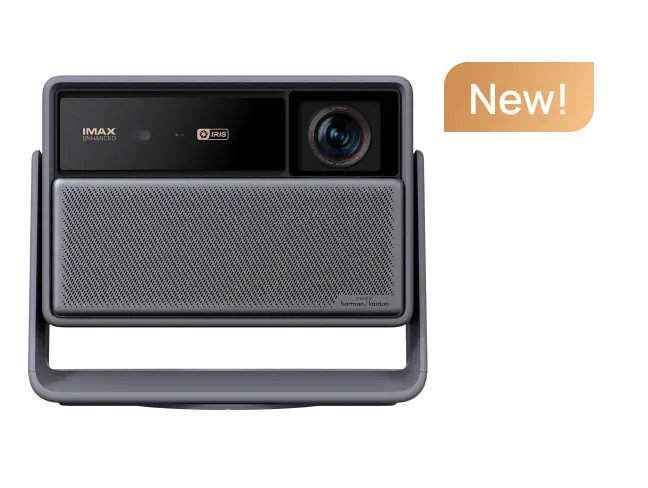
The XGIMI HORIZON 20 Max combines 4K UHD display resolution, an RGB triple-laser light source, and a manufacturer-rated 5,700 ISO lumens.
It supports Dolby Vision, HDR10+, and IMAX Enhanced. Optical zoom, a 1.2–1.5:1 throw ratio, and horizontal and vertical lens shift help accommodate different projector positions.
Google TV and built-in Harman Kardon speakers support everyday entertainment.
For gaming, XGIMI specifies 3 ms input lag at 4K/60Hz and 1 ms at 1080p/240Hz, with Game Mode active, VRR enabled, and automatic keystone correction disabled.
Best for: Multipurpose living rooms and home theaters that combine movies, streaming, and responsive gaming.
Important limitation: It requires standard-throw placement. Its published 20,000:1 contrast figure uses DBLE and should not be interpreted as native contrast.
XGIMI AURA 2 (New): For TV-Console Setups
The XGIMI AURA 2 (New) is a 4K ultra-short-throw projector using Dual Light 2.0 technology.
Its 0.177:1 throw ratio allows it to operate close to the screen instead of across the room.
It offers a manufacturer-rated 2,300 ISO lumens, Dolby Vision, IMAX Enhanced, Google TV with licensed Netflix, and four 15W Harman Kardon speaker drivers in a 2.0-channel arrangement.
Its specified image range is 90–150 inches, although XGIMI recommends 90–130 inches for optimal viewing.
Best for: Living rooms where placing the projector on a TV console is more practical than a ceiling or rear-shelf installation.
Important limitation: UST projection requires especially accurate positioning and a flat, compatible screen. Dolby Atmos format support does not mean the built-in speakers provide a complete surround-sound system.
The right home theater projector 4K setup is ultimately about balance. Start with the light you can control, choose a screen size that works from your seats, and confirm the required installation distance. Then compare contrast, HDR handling, streaming, audio, and gaming features that matter to your household. Thoughtful room planning will usually contribute more to everyday enjoyment than chasing a single headline specification.


