































Integrating Ambient Intelligence into Modern Decor
Imagine your living room wall gently displaying a rotating collection of digital art, a minimalist weather forecast, or a calming color wash that shifts with the time of day—all without the "black hole" effect of a large, powered-off television. Always-on projection is transforming from a niche AV setup into a practical tool for ambient intelligence, allowing projectors to serve as subtle, multifunctional lifestyle elements rather than just occasional movie-night appliances.

This approach allows design-conscious homeowners to treat projection as a dynamic part of the architecture. However, making a projector "always-on" requires more than just leaving it running. It demands a strategic balance of room conditions, energy management, and content selection to ensure the device enhances the home without becoming a source of noise or high utility bills.
Unlike fixed screens, projection offers the unique ability to "disappear" when not in use or change its scale and content instantly. To achieve this, it works best as a complement to your existing lighting design. For a deeper look at how these devices fit into daily life, this guide to living room projectors details how placement and brightness levels dictate the success of an integrated setup. For more on this topic, see Projector Fan Noise: How Quiet is 'Quiet Enough' for a Bedroom?.
Creative Applications for Always-On Projection
The most effective ambient setups prioritize low-motion, non-distracting visuals that provide "glanceable" information or aesthetic value. Based on common user patterns, here are the most successful applications:

- Digital Gallery Mode: Curate a rotating selection of high-resolution art or photography. This is particularly effective in hallways or above sideboards where traditional art might feel static.
- Minimalist Information Overlays: Project the time, local weather, or your daily schedule onto a neutral wall. This works best in home offices or kitchens during morning routines.
- Atmospheric Lighting: Use the projector to cast soft gradients or "window views" (like a rainy forest or a slow-moving sky). Accessories like the XGIMI Magnetic Creative Filter (3-Pack) can further diffuse the light into ripple or dreamscape patterns for a more organic feel.
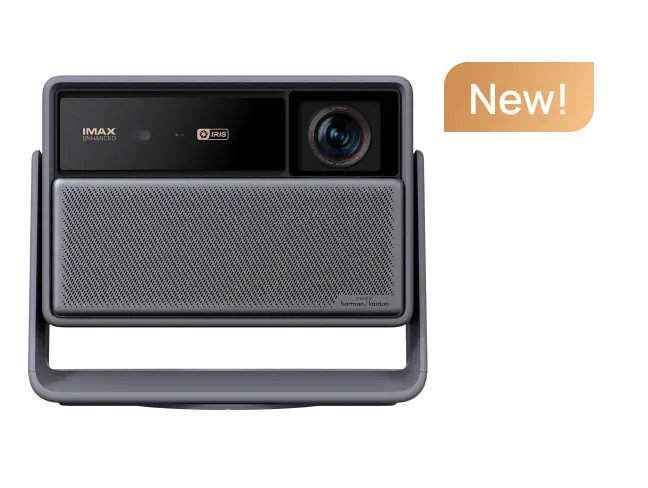
Models like the AURA 2 (New) feature dedicated Art Modes designed for this purpose, while the HORIZON Ultra provides the color accuracy needed to make digital paintings look authentic. To maximize efficiency, we recommend using smart home routines to trigger these visuals only when the room is occupied.
Evaluating Your Space: A Scenario Fit Guide
Not every environment is suited for continuous projection. Success depends on the "Ambient Light Rejecting" (ALR) capabilities of your wall or screen and the typical lux levels of the room.
The following table provides a heuristic guide for assessing practicality based on typical home conditions. (Scale: 3 = Highly Practical, 1 = Low Practicality).
Ambient Projection Fit by Room and Use Scenario
Use this as buyer-fit guidance, not as performance evidence.
View chart data
| Category | Practicality for ambient projection |
|---|---|
| Dim room / night mood art | 3.0 |
| Dedicated low-light ambient space | 3.0 |
| Mixed-use living room | 2.0 |
| Bright room | 1.0 |
| Primary TV space | 1.0 |
| High energy-savings priority | 1.0 |
Heuristic scenario guidance only, synthesized from practical usage considerations. Scale: 3 = High practicality, 2 = Medium practicality, 1 = Low practicality. Not measured data.
In dim or light-controlled environments, projection feels like a natural extension of the wall. In high-traffic, sun-drenched living rooms, the image may wash out unless you use a high-brightness laser model. If energy conservation is your primary constraint, we suggest limiting "always-on" use to evening hours when lower brightness settings (and thus lower power draw) are more effective.
Technical Realities: Power, Noise, and Longevity
Operating a projector for extended periods introduces specific technical considerations that differ from standard movie viewing.
- Energy Consumption: Modern LED and laser projectors are significantly more efficient than older lamp-based units. Typical power draw for a mid-to-high-end LED unit ranges from 60W to 160W, compared to 300W+ for traditional lamps. Using "Eco Mode" or "Ambient Mode" can often reduce this draw by 30-50%.
- Acoustic Comfort: Fan noise is a critical factor for ambient use. For a bedroom or quiet office, look for a projector rated at <28dB. At this level, the hum is generally masked by standard household background noise.
- Image Retention and Burn-in: While DLP (Digital Light Processing) technology is highly resistant to permanent burn-in, leaving a static image for 12+ hours can occasionally cause temporary "ghosting." We recommend using "Pixel Shift" features or setting the content to rotate every 15–30 minutes to maintain panel health.
- Light Source Lifespan: Most modern laser/LED light sources are rated for 20,000 to 30,000 hours. If run for 8 hours a day, the light source will still last approximately 7 to 10 years, making always-on use a viable long-term strategy.
Myth vs. Reality in Ambient Design
- Myth: A projector can replace all traditional lighting and art.
- Reality: Projectors are additive. They struggle to compete with direct sunlight and should be viewed as a "mood layer" that works alongside your existing lamps and decor.
- Myth: Always-on use will significantly overheat the room.
- Reality: While projectors generate heat, modern solid-state (LED/Laser) models run much cooler than bulb-based ones. However, you must maintain at least 15cm (6 inches) of clearance around exhaust vents to ensure proper airflow.
- Myth: Any wall works for ambient projection.
- Reality: Texture and color matter. A "flat" or "eggshell" finish in off-white or light gray provides the best balance of reflection and contrast. Highly glossy paints will create distracting "hot spots."
Selecting the Right Hardware for Aesthetics
For a projector to truly blend into a home, the hardware itself must be design-forward. Compact models with neutral finishes or ultra-short-throw (UST) designs that sit flush against the wall are ideal.
The Elfin Flip offers a portable, stylish profile that can be easily repositioned, while the broader laser projector collection provides the sustained brightness required for daytime ambient use. For those seeking a permanent installation that mimics a piece of furniture, explore the home projector range for models with integrated stands and automatic alignment features.
Implementation Checklist: Setup and Maintenance
To ensure your ambient setup remains a benefit rather than a chore, follow this self-check list:
- Ventilation Check: Is the projector placed in a spot with unobstructed airflow? (Avoid tight bookshelves).
- Brightness Calibration: Have you created a "Day" and "Night" preset? Lowering brightness at night saves energy and reduces fan noise.
- Stability Audit: For UST projectors, is the surface vibration-free? Even a 1mm shift can noticeably distort a large-scale ambient image.
- Content Rotation: Is your "Always-On" content set to change or dim after a period of inactivity to protect the hardware?
- Smart Integration: Is the device synced with a motion sensor or a sunset/sunrise schedule to prevent unnecessary runtime?
For more on the foundational benefits of these devices, see our article on the advantages of projectors for home entertainment, which covers eye comfort and scale.
Final Verdict: Is Always-On Right for You?
Ambient projection offers a sophisticated way to make technology feel more integrated and less intrusive. It is an ideal solution for those who value a "living" home environment that adapts to their mood and schedule. For more on this topic, see How to Project Ambient Visuals on Your Walls for Relaxation and Moo....
However, it is not a "set it and forget it" solution for every room. It thrives in spaces where you can control the light and where the goal is atmosphere rather than high-intensity utility. By selecting hardware designed for longevity and using smart scheduling to manage power, you can turn a blank wall into a window to a digital world.
Important Note on Comfort and Use: This guide is intended for aesthetic and home design purposes. It does not constitute medical or safety advice. Always ensure your projector is mounted securely according to manufacturer instructions. If you experience eye strain or headaches, reduce the brightness or increase the ambient light in the room. Results vary based on specific room acoustics, wall textures, and device specifications.


