






































Choosing the best streaming device for a projector feels simple until you realize that projectors have different needs than TVs. Audio passthrough, resolution support, and interface brightness all matter more than most people expect. Whether you own a home laser projector, a compact portable projector, or something in between, the right streaming stick can make or break the experience. Here is a clear breakdown to help you decide.
Why You Need a Dedicated Streaming Device
While many modern projectors come with built-in smart platforms, they are often the "weakest link" in your home theater. Built-in apps frequently lack official licensing for HD streaming (DRM limits), offer sluggish performance, or fail to support high-end audio formats like Dolby Atmos. A dedicated streaming stick acts as the "brain" of your setup, ensuring you get the full resolution, correct frame rates, and app stability that internal projector systems often sacrifice.

What Matters Most When Picking a Streaming Device for Projectors
Before jumping into comparisons, it helps to know what projector users actually care about. A streaming stick that works perfectly on a TV can still disappoint when paired with a projector, for reasons that are easy to overlook.
Audio Output
Most projectors have weak built-in speakers or none at all. That means your streaming device needs solid audio passthrough to an external soundbar or receiver. Dolby Atmos and DTS:X support are worth checking before you buy.
Ambient Light and Interface Readability
Bright, high-contrast interfaces are easier to read on a projected image, especially in rooms that are not completely dark. Some streaming OS designs cope better with this than others.
Resolution and HDR Compatibility
If you own a 4K home laser projector, you want a device that can deliver 4K HDR without downscaling. For a portable projector capped at 1080p or lower, that matters less, but HDR tone mapping still affects picture quality.
Size and Heat
A streaming stick sits behind or beside a projector. Some projectors run hot or have tight HDMI port spacing. A compact dongle is often easier to position than a box.
Roku for Projector Users: Simple, Affordable, and Broadly Compatible
Roku has long been the easiest streaming platform to set up. Its interface is straightforward, the app selection is wide, and the price range covers everything from basic sticks to capable 4K streamers.

Where Roku Does Well
The Roku Streaming Stick 4K and Roku Ultra both handle 4K HDR content reliably. Roku's OS is clean and not overloaded with ads in the way some competitors are. For users who want to plug in and start watching without much configuration, it delivers.
Roku also has strong broad compatibility. It works with nearly every streaming service, and its remote has a headphone jack on some models, which is handy when projector audio routing is still being sorted out.
Where Roku Falls Short
Roku lacks Dolby Atmos support on its lower-end sticks. The Roku Ultra does support Dolby Atmos, but only via optical or HDMI ARC, which matters if you are running audio through a soundbar. If you want lossless audio passthrough on a budget streaming stick for a projector setup, Roku may require buying up to the Ultra tier.
Roku also does not integrate as tightly with smart home ecosystems. If your home theater setup involves Alexa, Google Assistant, or Apple HomeKit, you may find Roku's options more limited.
Best for: Budget-conscious users, those new to streaming, and anyone who wants simple setup without a steep learning curve.
Fire TV for Projector Users: Alexa-Powered and Feature-Rich
Amazon's Fire TV lineup, including the Fire TV Stick 4K Max and Fire TV Cube, offers strong performance at competitive prices. The Alexa integration is the headline feature, but there is more to the story for projector users.

Alexa and Voice Control
Voice control is genuinely useful in a darkened home theater. Asking Alexa to launch an app, adjust volume, or search for content without fumbling for a remote is a real convenience. The Fire TV Cube takes this further by acting as a hands-free hub that can control other devices.
Dolby Atmos and HDR Support
The Fire TV Stick 4K Max supports Dolby Vision, HDR10+, and Dolby Atmos. For a Roku vs Fire TV projector comparison at the mid-range price point, Fire TV generally wins on audio and HDR format support. That matters if your home laser projector or soundbar supports these formats.
The Amazon Ecosystem Trade-Off
Fire TV's interface leans heavily toward Amazon Prime Video content. Ads and promotions appear on the home screen, which can feel cluttered. Non-Amazon apps work fine, but the experience is clearly optimized around Amazon's own services.
Fire TV also integrates well with Ring cameras and other Amazon smart home products. For households already in the Amazon ecosystem, this is a plus.
Best for: Amazon Prime subscribers, Alexa smart home users, and anyone wanting strong HDR and Atmos support without paying Apple TV prices.
Apple TV for Projector Users: Premium Performance With a Premium Price
Apple TV 4K is the most expensive option here, but it earns its price in several areas that matter specifically to projector setups.
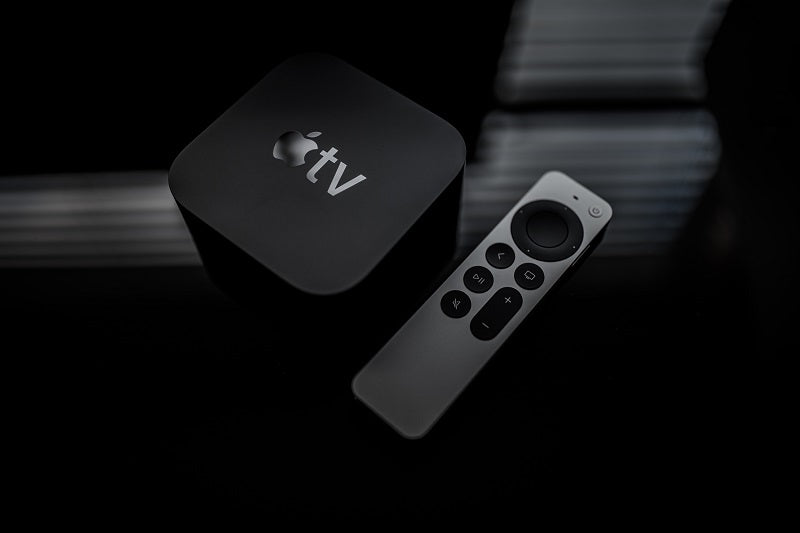
The Case for Apple TV 4K With a Projector
Apple TV 4K handles 4K Dolby Vision, HDR10, and Dolby Atmos with excellent consistency. Its A15 chip makes navigation fast and apps load quickly, which adds up over months of daily use.
The feature that stands out most for projector users is automatic frame rate and color matching. When enabled, Apple TV switches the output frame rate and color space to match the content being played. This reduces judder on film content and preserves the director's intended color grading. Most home laser projector setups benefit noticeably from this.
Ecosystem Fit
Apple TV for projector setups works especially well for iPhone and Mac users. AirPlay lets you mirror or stream content from Apple devices directly to your projector. HomeKit integration means you can include your projector and streaming device in automation routines.
The Siri remote is small and well-designed. The interface is bright and readable on a projected image, which is a practical advantage in less-than-perfect room conditions.
The Downsides
The price is the obvious barrier. Apple TV 4K costs more than twice as much as most Fire TV or Roku options. There is no built-in free content tier, so it relies entirely on subscriptions. And if you are outside the Apple ecosystem, many of its benefits become less relevant.
Best for: Apple ecosystem users, videophiles who care about color accuracy and frame rate handling, and anyone building a high-end home theater around a quality projector.
Quick Recommendations by Budget and Use Case
Different setups call for different choices. Here is a simple overview.
| Use Case | Recommended Device | Why |
| Budget portable projector | Roku Streaming Stick 4K | Affordable, easy to use, good 4K HDR |
| Amazon Prime household | Fire TV Stick 4K Max | Alexa, Dolby Atmos, great value |
| Apple household / high-end setup | Apple TV 4K | Frame rate matching, Dolby Vision, AirPlay |
| Alexa smart home integration | Fire TV Cube | Hands-free control, strong audio support |
| First-time projector buyer | Roku Ultra | Clean interface, broad app support |
For a portable projector that travels with you, the Fire TV Stick 4K Max and Roku Streaming Stick 4K are both compact enough to fit in a bag. The Apple TV 4K is a small box rather than a stick, so it is less grab-and-go, though still portable.
Connect Your Streaming Device and Projector the Right Way
Even the best streaming device will underperform if the connection is not set up correctly. A few things are worth checking before you finalize your choice.
HDMI Version and Port Availability
Confirm that your projector has an HDMI 2.0 or 2.1 port if you plan to stream 4K. Some older or budget projectors only have HDMI 1.4, which limits 4K HDR performance. Also check whether your projector's HDMI port has enough clearance for a dongle, or whether you will need a short HDMI extender cable.
Power Source for the Streaming Stick
Most streaming sticks draw power via USB. Some projectors have a USB port that can power a stick directly, which keeps the setup clean. If not, you will need a separate USB power adapter.
Audio Routing
If you are using an external soundbar or AV receiver, think about how audio flows from the streaming device to the speaker. HDMI ARC, optical audio, and Bluetooth each have different latency and quality profiles. Choosing a streaming device that supports your preferred audio path avoids headaches later.
Choose the Right Streaming Device for Your Projector Setup
The best streaming device for a projector depends on who you are and what you already own. Roku keeps things simple and affordable. Fire TV brings Alexa integration and strong audio format support for the price. Apple TV 4K delivers the most polished experience for those willing to pay for it. Match the device to your projector, your ecosystem, and your budget, and you will be set.
Frequently Asked Questions
Q1: Which Is the Best Streaming Device for a Projector Overall?
Apple TV 4K is the best streaming device for a projector if budget is not a constraint, thanks to its automatic frame rate matching, Dolby Vision support, and smooth interface. For most users, the Fire TV Stick 4K Max offers the best balance of performance and value, with strong HDR support, Dolby Atmos, and Alexa voice control.
Q2: Can You Use a Streaming Stick With a Portable Projector?
Yes, a streaming stick works well with a portable projector as long as the projector has an HDMI input and a way to power the stick via USB. The Fire TV Stick 4K Max and Roku Streaming Stick 4K are compact enough to carry alongside a portable projector without adding much weight or bulk.
Q3: Does Apple TV Work Well With Non-Apple Projectors?
Yes, Apple TV for projector use is not limited to Apple hardware. It connects via HDMI and works with any projector that has a standard HDMI port. The frame rate matching and color space features benefit any compatible projector, regardless of brand.
Q4: Is Roku or Fire TV Better for a Home Laser Projector?
For a home laser projector with full HDR and audio capabilities, Fire TV is generally the better choice between the two. The Fire TV Stick 4K Max supports Dolby Vision, HDR10+, and Dolby Atmos, which aligns better with what a high-end laser projector can display and output. Roku's Ultra tier matches this, but at a higher price than the Fire TV stick.
Q5: Do Streaming Devices Affect Projector Picture Quality?
Yes, the streaming device affects picture quality in meaningful ways. A device that supports your projector's native resolution and HDR format will look noticeably better than one that does not. Features like automatic frame rate matching (on Apple TV) or Dolby Vision (on Fire TV and Apple TV) can improve sharpness, motion handling, and color accuracy on a projected image.


