


































- Authorization: Republished with permission from the original author
There’s no denying that over the last couple of years, lifestyle projectors have really carved out their own space in the market. As many of the traditional projector brands have crept up in price, these newer players have stepped in and filled that $1,500 to $3,500 range with some compelling options. At the same time, they’ve pushed single-chip DLP projectors further than most of us probably expected, and that progress doesn’t seem to be slowing down.

As an enthusiast, I actually love seeing this happen. It’s not just about making projectors more accessible to a wider audience, but also about forcing the bigger brands to adopt new ideas. We’ve already started to see it with some companies. But with all that happening, there’s always been a bit of a disconnect for those of us with dedicated rooms.
If you’ve built out a theater or have a dedicated movie room, chances are you don’t really want a tiny cube hanging from the ceiling. I was recently talking with another forum member about exactly this. He loved the idea of a lifestyle projector, but after finishing a full room build, his family couldn’t stop joking about how out of place a small box would look in the middle of it. And honestly, I get it.

It feels like some of these “lifestyle” projector companies are starting to recognize that gap. As their products have evolved, the natural next step has been moving into more traditional, dedicated home theater territory. One of those companies is XGIMI. The company is primarily known for its lifestyle projectors, but they decided it was time to step into a different category with the XGIMI TITAN 4K laser projector. While you can still use it in a more casual, lifestyle setup, the TITAN feels like something altogether different from what XGIMI has done before.
article_product1
1. Features

A big part of that shift starts with the hardware. Instead of the familiar 0.47-inch DMD chip commonly used in lifestyle projectors, the TITAN uses a much larger 0.78-inch DMD developed by Texas Instruments. That larger chip provides a reflective surface roughly 2.8 times bigger than the 0.47-inch option, which allows for more efficient light usage, higher native contrast, and a bit more fine detail.
The projector still uses XPR pixel shifting to achieve 4K resolution, but as we’ve seen time and time again, from normal seating distances, it’s almost impossible to tell the difference compared to native 4K.

The light engine is another area where the TITAN separates itself from XGIMI’s earlier designs. The company calls it the Ultra Bright Pro Light Engine, which combines a laser unit, phosphor wheel, color wheel, mirrors, and lens to produce a claimed 5,000 ISO lumens, which is quite bright.
Where things really start to feel “non-lifestyle” is with placement flexibility. Instead of relying purely on digital keystone correction, the TITAN includes a fully motorized lens shift system. You get optical zoom with a throw ratio ranging from 1.2 to 1.8, along with a generous lens shift range, up to 100% vertically and 40% horizontally. That allows you to dial in image placement without degrading the image through digital correction. This means you can hit a 150-inch screen from about 13.1 feet or go all the way up to a 200-inch image from roughly 17.4 feet away. XGIMI rates the TITAN for screen sizes between 100 and 250 inches.
On the format side, the TITAN supports HDR10, HDR10+, HLG, Dolby Vision, and IMAX Enhanced, covering just about everything you’d expect at this level. For gaming, you’re looking at 4K at 60Hz with ALLM support. There’s still no 4K 120Hz capability, though the projector will accept 1080p signals up to 240Hz. Another thing worth mentioning is the built-in audio. This isn’t something you typically see on dedicated home theater projectors, but it makes sense coming from a company like XGIMI, which has a lot of experience integrating speakers into its lifestyle models.

2. Design
The TITAN immediately feels different from XGIMI’s other lifestyle-focused projectors, and I’m assuming that’s very much intentional. The design feels more like it’s more for a permanent placement rather than portability. The chassis rests on four solid metal feet that raise it slightly off the surface, giving it a stable, planted feel when placed on a shelf. The feet are also height-adjustable, which helps with fine positioning. They can be removed entirely as well, making ceiling installation much more straightforward without the need for awkward adapters or third-party hardware.

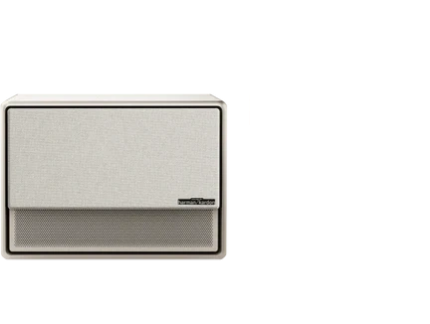
The cabinet is finished in black with a subtle faux-leather texture that feels more refined than the glossy plastics you usually see on lifestyle models. It gives the projector a more furniture-friendly look but isn’t trying too hard to stand out. The front of the unit is fully covered by a fabric grille, which doubles as an acoustically transparent cover for the built-in speakers. One thing you do notice right away, though, is that the lens sits off to the right when viewed from the front instead of being centered.
The front panel also houses an array of sensors. On either side of the lens are dual time-of-flight sensors and dual camera modules, forming a quad-lens system used for distance measurement, automatic image correction, and eye-protection features. The projector itself measures 17.4-inches wide, 13.6-inches deep, and 6.2-inches tall, with a weight of about 25.4 pounds.

Around the back, you get two HDMI 2.0 inputs, with one supporting eARC. There are also USB 3.0 and USB 2.0 ports for media playback or accessories, along with both analog audio output and optical digital output for external audio systems. For wired networking, there’s an Ethernet RJ45 port, and XGIMI also includes an RS232 connection for integration with control systems.
The power supply is also built directly into the chassis. There’s no external power brick to deal with, which makes a big difference when it comes to installing the projector on the ceiling. For wireless connectivity, there’s even built-in Wi-Fi and Bluetooth, making it easy to control accessories or external speakers without running additional cables if you don’t need to.

3. Remote
The TITAN ships with a Bluetooth remote that strikes a good balance between style and usability. One thing that always bothered me about older XGIMI remotes was the lack of a backlight, and just like the Horizon 20 from last year, that’s been addressed here as well. The lighting doesn’t cover every single button, but it does highlight the ones you’re most likely to use, which makes a big difference in a dark room.
The remote itself is slim and lightweight, with a brushed metal finish that feels solid. At the top are quick-access buttons for picture presets like Standard, Movie, Vivid, and TV, followed by dedicated buttons for input selection and automatic focus and adjustment. Below that sits a directional pad, along with Home and Settings buttons that are easy to reach without shifting your grip. XGIMI also includes physical buttons built directly into the projector chassis, located beneath the connectivity panel. These handle basic functions and come in handy during setup.

4. Setup and Picture modes
Unlike the lifestyle projectors from XGIMI, there are no built-in Smart TV features here, and honestly, I’m perfectly fine with that. I’m using an Apple TV in my setup anyway, and I’d much rather see the focus placed on image quality and optics than an onboard streaming platform that I’ll never touch. Setup is also straightforward. Features like autofocus and motorized lens shift, something you typically don’t get on lifestyle projectors, make dialing in the image quick and far less frustrating.
I tested the projector in a couple of different setups. In my light-controlled media room, I had it positioned about 14.5 feet back, projecting a 138-inch 2.35:1 image onto a Stewart Filmscreen StudioTek 130 G4. I also spent time with it in a brighter living room setup, where it was placed roughly 11 feet from a 120-inch 16:9 ALR screen.

The TITAN includes a good selection of picture modes. For SDR content, you get Standard, Movie, Vivid, Game, Sports, and High Power. HDR content has its own set of modes, including Standard, Movie, Vivid, TV, Sports, Filmmaker Mode, and a Performance Mode that will brighten up the picture but will be basically unusable for anything else, given its green shift. For anyone who wants to go beyond the presets, the projector offers full calibration controls. That includes both a quick 2-point and a more detailed 11-point white balance adjustment, along with gamma calibration for fine-tuning grayscale performance.
For video gaming, the TITAN offers a dedicated interface aimed at reducing input lag, with several specific modes including Standard, FPS, RPG, RTS, and Sports. As far as projector noise goes, this thing is pretty quiet, coming in at around 35 dB at three feet with the brightness slider set to 10, and even quieter at a normal seating distance.

5. Performance
● Sharpness
One of the biggest strengths of DLP has always been sharpness, and the TITAN absolutely leans into that. Pair that with the new 0.78-inch DMD chip, and you get a very crisp, detailed image. Even though this isn’t technically a native 4K projector and relies on pixel shifting, it still resolves fine detail extremely well and handles 1080p upscaling way better than I was expecting.
● X1 AI Image Chip
There’s a new X1 AI Image Chip onboard that enables several processing features, including AI-PQ, AI-SR (Super Resolution), and AI-HDR. There’s also an AI 4K Upscaler designed to add detail to lower-resolution content without going overboard.

- Watching Captain America: Civil War, these features made a noticeable difference. With processing enabled, I could clearly see the stitching on Captain America’s suit, finer facial detail in close-ups, and more texture in his helmet and the brown leather straps holding the shield. With the processing turned off, those details were still there, just not as pronounced. The image definitely looks sharper with these modes active, but I can see some viewers preferring the slightly softer, more natural presentation with them disabled.

● Reduced Rainbow Effect
DLP projectors can sometimes struggle with rainbow effect, and I know that’s something a lot of people here are sensitive to. I am too, and despite seeing a few early reports on the forums, I barely noticed it during my time with the TITAN. Even when it comes to laser speckle, it’s very minor. Depending on your screen material, you might catch a trace of it if you’re standing close, but in normal viewing conditions, it’s essentially a non-issue. XGIMI attributes this to its multi-axis LSR diffusion modules and half-wave plates designed to suppress speckle, and based on what I’m seeing, they’re doing their job.

● Brightness
Brightness is another thing you notice almost immediately when you fire this projector up. In its brightest Performance mode, with the laser brightness set to 10, I measured 6,795 ANSI lumens, which is well above XGIMI’s published spec. I wouldn’t recommend using this mode for regular viewing. There’s a heavy green push that makes the image look unnatural, and the fans ramp up enough to become distracting.

After calibration, Filmmaker Mode measured 4,320 ANSI lumens, which is still extremely bright for a home theater projector and more than enough for HDR. Even with the brightness slider set to 5, I was still getting 2,732 ANSI lumens. Filmmaker Mode is the most accurate preset out of the box, but it still measured a Delta E around 8.4, which is a bit off from reference. Because of that, I’d recommend a proper calibration once you get the projector in your space.
It’s also worth pointing out just how much headroom the TITAN has to work with, because that brightness reserve really matters once you start watching HDR content. With several hundred nits actually usable on screen, the projector can present HDR in a way most traditional home theater projectors simply can’t. Highlights don’t get crushed or clipped, and bright elements retain their punch without flattening the rest of the image.

● Black Level Performance Enhanced by DBLE
Black level performance is helped quite a bit by XGIMI’s Dynamic Black Level Enhancement, or DBLE. This system adjusts the laser output in real time based on what’s on screen. Dark scenes get reduced light output to deepen blacks, while brighter scenes allow the laser to open back up so highlights don’t feel restrained. Native contrast measured at 2,188:1 at a roughly mid-throw distance, which is already really good for a projector at this price point. When looking at dynamic contrast, that number jumps significantly to around 175,842:1, though that measurement is with both Dynamic Contrast and AI Contrast enabled.
Going back and forth between having these modes on and off, the results really depend on the content. Dynamic Contrast does improve overall contrast, but in darker scenes, it can cause a small loss of shadow detail. I found myself leaving it on for brighter movies and turning it off when watching darker material. AI Contrast, however, does introduce a bit of noise into the image. It’s not very noticeable at a normal seating distance, but if you’re sitting closer than about five feet, I’d recommend leaving it off.

With DBLE enabled, I did notice a slight color shift in darker scenes, especially with skin tones. That said, XGIMI includes an adjustment called “Dynamic Black Level Correction,” which is a slider ranging from –40 to +40. This is designed to compensate for the color shifts caused by dynamic laser management, and I must say this works really well. Once you have it dialed in, I didn’t notice any color shifts throughout my time with the projector.

When I reviewed the Horizon Max 20 late last year, DBLE did not work with Dolby Vision content. I’m happy to report that XGIMI updated that via a firmware update at the end of last year, and it’s no longer an issue here as well with DBLE now working properly with Dolby Vision. With AI Contrast turned off, shadow detail remained really good. In the John Wick 2 tunnel fight scene, for example, the brick textures along the tunnel walls were still easy to make out without crushing detail.

● Color
Color performance is a clear strength of the dual laser engine, and the TITAN shows this well. The projector covers roughly 97% of the DCI-P3 color space and about 81% of BT.2020. In the first Moana film, when Moana meets the ocean, the green tones in the background trees looked rich, and the turquoise water appeared saturated without looking overdone. The projector also handled color gradations well with no obvious banding.

● Motion Handling
Motion handling is another area where the TITAN performs well, especially once you spend a little time dialing it in. XGIMI includes MEMC on the TITAN, and when it’s enabled, the benefits are easy to see. Fast pans and tracking shots look smoother, and detail holds together better during quick action, which is especially noticeable with sports broadcasts and high-motion scenes. I found the Medium setting to be the sweet spot. At that level, camera movement becomes smoother and more coherent without pushing things too far. The Low setting helps a bit but doesn’t fully eliminate judder on more demanding 24p content, while higher settings start to introduce the soap opera effect that many people, myself included, prefer to avoid.
MEMC isn’t something everyone will want to use, though. If you’re a purist and prefer native 24p playback, turning it off gives the image a more traditional, cinematic feel. The good news is that XGIMI gives you the flexibility to choose. Watching fast-moving content like sports, MEMC on Medium made NBA games and football broadcasts easier to follow, with less stutter during quick camera pans.
6. Gaming
Gaming on the XGIMI TITAN is a solid experience, especially once you take advantage of its low-latency features. I tested it with a PlayStation 5, spending most of my time in Hogwarts Legacy, and the input response felt consistent. Measured input lag came in at roughly 31ms at 4K 60Hz, dropping to around 16ms at 1080p 240Hz, which puts it in a good place for console gaming.
The TITAN also supports ALLM, allowing it to automatically switch into a low-latency mode when it detects a compatible gaming source. This disables unnecessary video processing without requiring manual adjustments, which keeps things simple. With ALLM engaged, controls felt direct, and movement remained easy to manage. While this projector isn’t positioned as an esports display, it handles action games and sports titles without feeling sluggish.

7. Audio
Given XGIMI’s history with lifestyle projectors, it’s not surprising that the TITAN includes a built-in audio system, and for what it is, it does a respectable job. Dialogue comes through clearly and stays intelligible even at moderate volume levels, which makes it perfectly usable for casual viewing.
Where the internal speakers start to show their limits is with more demanding material. Low-frequency output is fairly restrained, so big action scenes and cinematic soundtracks don’t have the weight or impact you’d expect from a dedicated home theater setup. It works well as a fallback or for temporary setups, but given the image quality and scale the TITAN is capable of, pairing it with a soundbar or full surround system makes a lot of sense.

Final Thoughts
Stepping back and looking at the XGIMI TITAN as a whole, it feels like a very natural progression for a company that built its reputation in the lifestyle projector space. As those products have continued to improve, it was only a matter of time before XGIMI took a more serious step toward a dedicated home theater design. For a first entry into that space, the TITAN is impressive. It doesn’t feel like a scaled-up lifestyle projector, but rather a product designed from the start with large-screen viewing in mind.
At $3,999, the XGIMI TITAN sits in a very competitive space, but the combination of sharpness, brightness, and its capabilities to handle both HDR and Dolby Vision makes it stand out when compared to other projectors. This projector represents a major step forward for XGIMI, and I’m excited to see where the company is headed next. For its performance and feature set, the XGIMI TITAN earns an AVSForum Top Choice Award for 2026.
Pros
- Excellent build quality
- Very bright picture
- 0.78-inch DMD chip
- Motorized lens shift and zoom
Cons
- AI contrast may add some image noise
- Performance mode is not usable for daily viewing
- No 4K/120Hz support for gaming


